Options and Operations
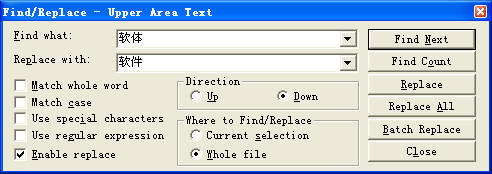
You can check the "Use regular expression" option in Find/Replace
or Batch Replace to enable regular expression.
When this option is checked, the options "Match whole word" and
"Use special characters" will be hidden, but the "Match case" option still can
be used.
The "Match whole word" option is hidden because there are alternative and more
delicate options within regular expression syntax. You can add \b
switches at both sides of an expression for the same result. So the regular
expression \bword\b means word with "Match whole word" on. You can
also add the \b switch to only one end of an expression, so \bword
matches both word and words. There is also a relevant capital
switch \B, which means non-word border. So the regular expression word\B
can match words, but not word.
The "Use special characters" option is hidden because it is STGuru's private
feature. All it has are covered in regular expression syntax.
Regular Expression Basics
Regular expression is a highly professional technology, but also with strong
power. You may need a half day or even two whole days to learn its basics if you
haven't learned it before. The knowledge of regular expression needs a book to
describe, and we will not provide detailed instructions on this knowledge system
in this page. There is a list of select online regular expression tutorials
later in this page. You can learn the tutorials if interested.
We will introduce basics of regular expression via some examples.
But first, here is list of common regular expressions metacharacters with
descriptions:
|
Metacharacter |
Introduction |
Comment |
|
\b |
Word border. It is only a position, not a character. |
This metacharacter
only indicates a position, rather than a specific character or string.
\bword\b matches word with the option "Match whole word" on.
This metacharacter can be used at left or at right separately. You can use
it only at the left of a word or expression, or only at the right of it. |
|
\B |
Within a word, rather than at the border of the word. |
This metacharacter
only indicates a position, rather than a specific character or string.
\bword\B means the word here must be the left part of some
word. So it matches words, but not word. |
|
\s |
Any white-space character - space, tab, or form feed. |
[ \f\n\r\t\v] |
|
\S |
Any character except for white-space character (space, tab, or
form feed). |
[^ \f\n\r\t\v] |
|
\d |
A digit (0-9). |
[0-9] |
|
\D |
Any character except for digits (0-9). |
[^0-9] |
|
\w |
Any alphanumeric character (a-z, A-Z, 0-9). |
[A-Za-z0-9] |
|
\W |
Any character except for alphanumeric characters (a-z, A-Z or
0-9). |
[^A-Za-z0-9] |
|
\A |
The start of the whole text. |
This metacharacter only indicates a position, rather than a
specific character or string. |
|
\Z |
The end of the whole text. |
This metacharacter only indicates a position, rather than a
specific character or string. |
|
^ |
The start of a line. This is a position, rather than a specific
character. |
This metacharacter only indicates a position, rather than a
specific character or string. |
|
$ |
The end of a line. This is a position, rather than a specific
character. |
This metacharacter only indicates a position, rather than a
specific character or string. |
|
. |
Wildcard. It matches any character except for line feed. |
|
|
* |
Repeats 0 or more times. |
|
|
+ |
Repeats 1 or more times. |
|
|
.* |
Combination of "." and "*". It matches any string (but not
including line feed) of any length. |
|
|
.*? |
A variation of ".*". It matches the shortest matching result.
".*" (without "?") will give the longest matching result |
|
|
[Character Set] |
Matches any character in the character set. It starts with "["
and ends with "]". The string between is a group of characters to match. |
[A-Z] matches any of the 26 capital English letters from A to Z; [a-z]
matches any of the 26 lowercase English letters from a to z; [0-9] matches
any numbers between 0 and 9; [A-Za-z0-9] means all the three groups; [aieou]
matches a, i, e, o or u. |
|
[^Character Set] |
Matches all characters except those in the character set. |
[^aieou] matches any character except for a, i, e, u or o. Valid
examples are "2", "b" and "-". |
|
\metacharacter |
This is an escape sequence starting with a backslash "\" as the escape
character. If a character has a special meaning. Escaping it with "\" can
cancel its special meaning and indicate the character itself. |
For example, "\[" means the character "[" , and "\]" means the character
"]". If you write "[" or "]" directly, it means one half of "[]" which as a
pair is used to mark the start and end of a bracket expression, indicating a
character set. "[" or "]" cannot indicates the character itself. To match
the character "[" or "]" itself, you need to escape it with backslash "\". |
|
\n |
Windows carriage return. It is the same as "\r\n" in Windows
programming. |
|
|
\t |
Tab. |
|
|
| |
This character can be used to join multiple choices. When
there are three or more components in an expression, this metacharacter,
however, does not behave stably and can sometimes run into errors. So please
be careful when using it in such situations. You are suggested to test it
with several samples before putting it into use. |
"A|Z" means A or Z. |
|
() |
Collection. |
The stuff enclosed in the parentheses is regarded as one thing,
an integrated collection, such as ([A-Z][0-9][0-9]). |
|
{n,m} |
Repetitions. Valid
forms are {n,m}, {n,} and {n}.
n is the minimum repeat count and m is the maximum repeat count. The maximum
repeat count m can be omitted (which means the previous part is repeated at
least n times, but there is no upper repeat limit); however, the minimum
repeat count n cannot be omitted.
{n,m}: Repeat n-m times. E.g., {1,5} means repeating 1 to 5 times.
{n,}: Repeat at least n times. E.g., {0,} means repeating 0 or more times,
which is the same as *; while {1,} means repeating 1 or more times, which is
the same as +.
{n}: Repeat n times. E.g., {5} means repeating 5 times. |
The metacharacter means repeating the previous part for specified times. It
is often used after a collection (exp).
Some examples:
\w{1,}: Same as \w+, which matches a string made up of at least one
alphanumeric character (a-z, A-Z or 0-9). It is often used to match a word.
(\w+ ){1,5}: It matches a string made up of 1-5 words, with a space as the
interval between adjacent words. Note that there is an ending space. |
Ex 1
This matches lines, each containing a label of a format like
"[StudentA02]". Specifically, the label is bordered at left and right with "["
and "]". The part in the bracket is started with the capital word Student,
followed by a capital letter and two numbers (01-99), such as:
学生 [StudentA02] 上午上数学课。
学生 [StudentC93] 早上打扫卫生。
If we suppose there is no rare exceptions, such as [StudentN00], we can simply
search with the following expression:
^.*?\[Student[A-Z][0-9][0-9]\].*?\n
Ex 2
a
This matches all lines NOT containing
"student":
(?!.*student)^.*$
The syntax involved is "(?!exp)", which matches a position where
exp is not found. This usage is described in The 30 Minute Regex Tutorial below.
It can be seemed as a simplified version of:
b
This matches all lines containing "teacher", but NOT containing
"student":
(?!.*student)^.*?teacher.*?$
Ex 3
a
This matches the line “Start Line” and all lines before it:
\A(.*?\n){2,}Start Line\n
b
This matches the line "End Line" and all lines after it:
^End Line(.*?\n){2,}.*?\Z
Ex 4
a
This matches a line containing a string that starts with the word
“and”, ends with the word “whose” and contains any 2 words (a word is a string
made up of alphanumeric characters):
^.*?\band \w+ \w+ whose\b.*?\n
b
This matches a line containing a string that starts with the word
“and”, ends with the word “whose” and contains any 0-5 words (a word is a string
made up of alphanumeric characters). If the word count is 0, it means a line
containing “and whose”:
^.*?\band (\w+ ){0,5}whose\b.*?\n
Recommended Online Regular Expression Tutorials
Do not be misled by the words 30 minute in the following
titles. You usually need a half day or two to have a rough understanding of the
delicate use of regular expressions. To fully master it?...a lot lot of time,
but may not be really necessary. You can also focus on some most attracting
features and use them to hasten your work. It may not take too long for you to
start this way.
The 30 Minute Regex Tutorial
An English tutorial. 30 minutes is obviously NOT enough. You need
a half day or even two days to grasp the basics.
Original URL:
http://www.codeproject.com/KB/dotnet/regextutorial.aspx
Search in Google:
http://www.google.com/search?num=100&hl=en&newwindow=1&c2coff=1&safe=active&biw=1920&bih=915&q="The+30+Minute+Regex+Tutorial"&btnG=Search&aq=f&aqi=&aql=&oq=
Introduction to Regular Expressions
A tutorial by Microsoft.
Original URL:
http://msdn.microsoft.com/en-us/library/28hw3sce
Search in Google:
http://www.google.com/search?num=100&hl=en&newwindow=1&c2coff=1&safe=active&biw=1920&bih=915&q="Introduction+to+Regular+Expressions"&aq=f&aqi=&aql=&oq=
The most important part (regular expression syntax):
http://msdn.microsoft.com/en-us/library/ae5bf541.aspx
Settings of the Regular Expression Engine Used by STGuru
Match Case mode: You can specify this option in the dialog box.
Multiline mode: Fixed as True.
Singleline mode: Fixed as False.
There are different regular expression engines. They are same in
standard/major features, but might be slightly different in some minor details.
The engine used by STGuru can also be different in a few minor details from
those in the tutorials. You need to test by yourself to find the differences.
4.4 Batch Replace
When you check on the Enable Replace check box
at bottom left of the Find/Replace dialog box, the professional level edit
function "Batch Replace" is enabled.
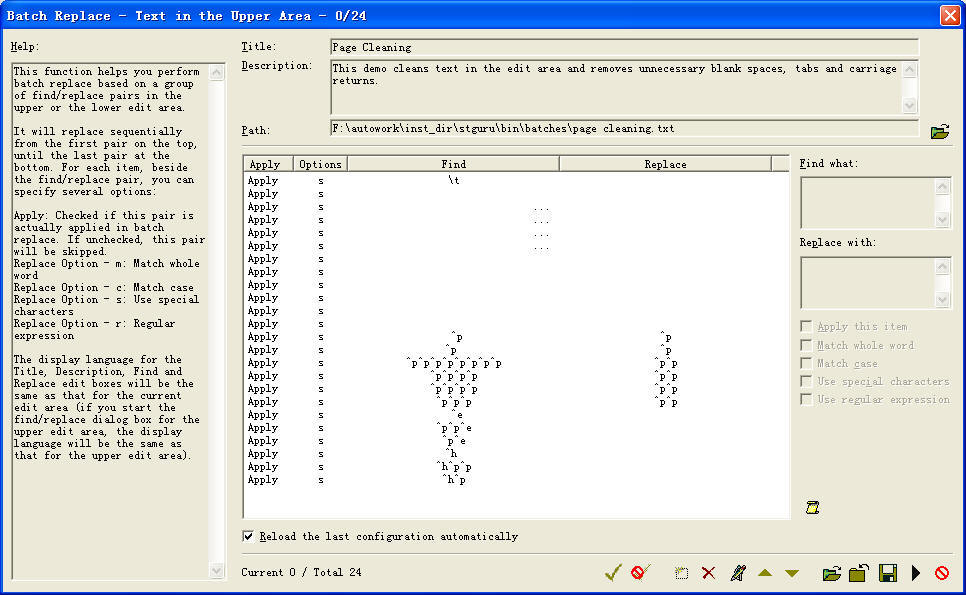
Click the "Batch Replace" button to open the
"Batch Replace" dialog box:
Pic
UG-4-2 The main Batch Replace dialog box
You can, in one click, perform a series of replace operation for
unlimited number of find/replace pairs in predefined order. You can set four
independent options for each pair - Apply, Match Whole Word, Match Case, and Use Special Characters. You
can save each batch replace configuration to a batch file for long term use.
This is not only a great tool for text editing, but also of great additional
help for code conversion between Simplified Chinese and Traditional Chinese.